AI front desk for appointment-based businesses
Turn every conversation into the next action.
Evarmont answers your calls, understands what customers need, and coordinates the calendar, CRM and team workflows that move the work forward.
Connected to your business
Works with the tools you already use.
Calendars, CRMs, team channels, payments and the mailbox: Evarmont connects to the accounts your business already has. You authorize each one yourself, and it is scoped to your business.
- Google Calendar
- Microsoft Outlook Calendar
- Cal.com
- Calendly
- HubSpot
- Stripe






- Slack
- Microsoft Teams
- GmailEarly access
- Microsoft OutlookEarly access
- Pipedrive
- GoHighLevel






Every conversation, on record.
Pick a front desk. It calls you.
Choose the kind of business and give us your own number. Evarmont rings you back in character, takes the booking, and hands the call over the way it would for a customer of yours.
Or call the line yourself +1 786 418 2879
One front desk. Every channel.
Every customer conversation, handled from one system.
Evarmont answers the phone and reads the mailbox, understands what the customer needs, and completes the next step inside the calendar, the CRM, the kitchen and the team channel. Choose a capability, or let the tour run.
Every call becomes an outcome.
Evarmont answers on your line, understands why the customer is calling, checks your calendar and your rules, and completes the next step while they are still on the phone. No menus, no message pad.
How it works
It doesn’t just answer. It gets the work done.
Pick a business and follow one call through. Each step shows what was said, what Evarmont decided, which system acted, and where the result lands in your console.
Simulated with sample data. Names, numbers and times are fictional and consistent across this page.
- Call
AgentThanks for calling Lumen Aesthetics. How can I help?
- Understand
CallerHi, I’d like to book a first consultation, ideally Thursday afternoon.
AgentHappy to help. Have you visited us before?
CallerNo, this would be my first time.
- Decide
AgentConsultations run about forty-five minutes. On Thursday the tenth I have 2:30 or 4:15 in the afternoon.
- Act
Caller2:30 works.
AgentYou’re booked for Thursday, September 10 at 2:30. Your booking reference is V X 4 8 2 7. I’ll say that once more: V X 4 8 2 7.
- Record
CallerGreat, thank you.
AgentYou’re welcome. See you Thursday.
- Notify
After the call. Nothing more is said.
- System
- Evarmont voice line
- Operation
- inbound call admitted
- Rule applied
- Line is inside business hours, spam screening passed.
- Result
- Answered. Call status: In progress.
- Recorded in
- Calls › +1******4821
Simulated with sample data. Names, numbers and times are fictional and consistent across this page.
Calls and email
Two channels. One front desk.
A call becomes a call record. An email becomes a case. Both land in the same console, under the same roles, with the same rule: nothing is promised that was not done.
- 9:41 AMCallA new client books a consultation+1******4821 · 0:38Booking created · VX-4827
- 10:05 AMEmail“Saturday consultations?”Triaged: FAQ · normalDraft ready · 2 facts cited
- 10:10 AMEmailThe reply goes outAutomatic reply · after the 5-minute holdSent
- 11:30 AMCallA returning client moves a treatment+1******2204 · reference read backBooking changed
- 2:12 PMEmail“Refund for last week’s treatment”Triaged: refund · sensitiveHanded to a person
- 6:40 PMCallAn after-hours call+1******0157 · consent recordedCallback queued · 9 AM window
The email front desk is in early access and enabled per business.
Integrations
Built into your operation, not beside it.
Evarmont reads availability, writes appointments, keeps the CRM current, posts to the team and takes deposits through the accounts you already have. You authorize each connection yourself and can disconnect it at any time.
- ReadsFree and busy intervals on the calendar you chose
- WritesAppointment events: created, moved, cancelled
- Reacts toCalendar change notifications, which start a re-read
- And thenThe mirror is reconciled; a retry never makes a second event
Connections use each provider’s own sign-in. Evarmont never sees your provider password.
The console
Know what your front desk is doing.
What happened, what is healthy, what needs attention, and what to do next. The overview below is the console’s own interface with a sample business, at its real scale.
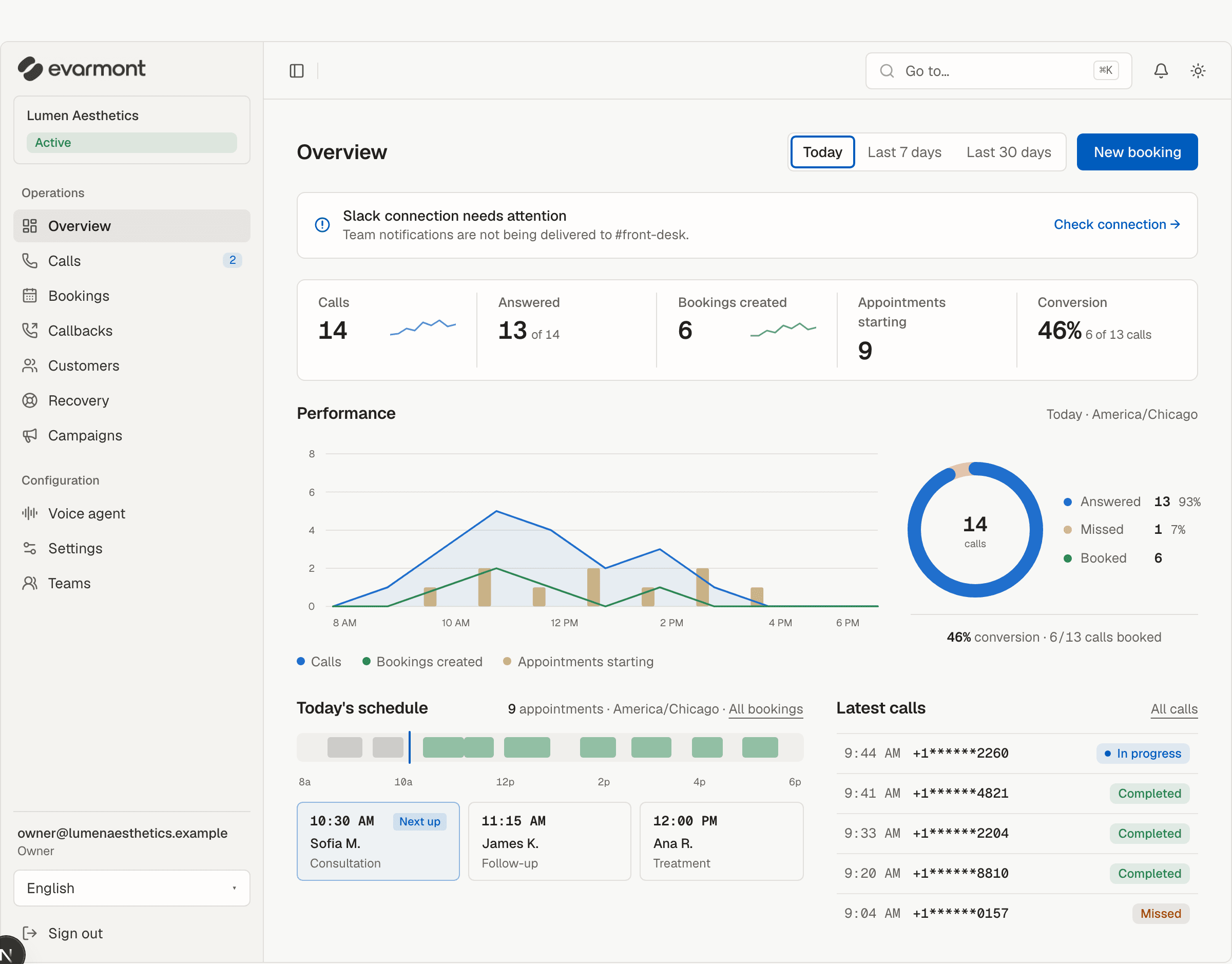
Activity
Sep 2 · America/Chicago- Call answered9:41:09 AM
- Intent detected · new client consultation9:41:14 AM
- Availability checked · Google Calendar · 2 open slots9:41:20 AM
- Booking created · VX-48279:41:31 AM
- Appointment created · Google Calendar · Front desk9:41:33 AM
- Contact created · HubSpot · Maya O.9:41:36 AM
- Call completed · outcome: Booking created9:41:47 AM
- Notification sent · Slack #front-desk · accepted for delivery9:41:48 AM
- Incoming call · +1******2260 · in progress9:44:02 AM
- Calls and outcomes
- Call status and business outcome are two facts. You see both, per call and for the period.
- Bookings and demand
- Bookings created, appointments starting, the services people ask for and the weekdays they fill.
- Email cases
- How many were answered automatically, approved by staff, or handed to a person. Early access.
Control
Automation when it should. People when it matters.
Every statement here is a behaviour of the product, not a promise about outcomes. The rules are yours; Evarmont never implies more than it can prove.
- When
- A caller asks for a person
- Then
- During hours, transfer to staff.
- Otherwise
- After hours, queue a callback inside the 9 AM to 6 PM window, up to 3 attempts, with consent recorded on the call.
- When
- A caller wants to change a booking
- Then
- Ask for the booking reference. No security questions.
- Otherwise
- The old slot is released only when the new one commits.
- When
- An email asks for a refund, a cancellation or anything sensitive
- Then
- Hand it to a person. Never answer it automatically.
- When
- A reply is drafted
- Then
- Send it after a person approves it.
- Otherwise
- Or automatically after a 5-minute hold you can cancel, where you allow it.
- When
- Someone opens a transcript
- Then
- Owners, admins and managers only.
- Otherwise
- Other roles never receive the text; the server leaves it out.
- Handoff to a person
- A caller can be transferred to staff during hours. When a transfer fails, a callback is queued and the reason is recorded on the call.
- Your business rules
- Service durations, buffers, minimum notice, booking horizon and per-location hours are configured by you. The agent offers only what those rules allow.
- A booking is a database fact
- Availability is advisory. The slot is held by a database constraint when the booking commits, so two callers cannot book the same resource at the same time.
- Structured call records
- Every call keeps a transport status, a business outcome, a timeline of events and, where permitted, a transcript with its retention date.
- Connections you control
- Each integration is connected through the provider’s own authorization, scoped to your organization or a location, checked on request, and disconnected in one click with its consequences spelled out.
- Failures stay visible
- Follow-through jobs retry with backoff and a maximum attempt count. A job that cannot succeed is parked with a reason you can read. A failed notification never undoes a booking.
- Roles that remove, not hide
- Owner, admin, manager, employee and viewer roles decide what a person can see and do. Fields a role may not see are left out by the server, not hidden by the screen.
- Time is always explicit
- Every time is shown in the business’s own time zone with its label, so a booking made from another region reads correctly at the front desk.
Evarmont does not claim any certification on this page. Ask us about your compliance requirements before you connect a live line.
Businesses
Built first for businesses that live by the calendar.
The rules differ by trade: how long a service takes, who may change a booking, what happens after hours. The workflow stays the same.
“I’d like to book a first consultation, ideally Thursday afternoon.”
Consultations, treatments and follow-ups with real durations, buffers and rooms. New clients are booked; returning clients are recognized by number. No health details are asked for on the phone.
- Book
- move or cancel with the reference
- deposit through Stripe, if you require one
- confirmation text
- Google Calendar
- HubSpot
- Slack
- Stripe
Pricing
Three plans. One front desk.
Every plan runs the whole product; they differ only in the call minutes included each month. Start with a free trial and choose a plan in the console when you are ready.
Starter
525 call minutes a monthStart a free trial$299a month
About 17 minutes of calls a day, averaged over a month.
Extra minutes: $49 per 100, bought only when you need them.
Growth
925 call minutes a monthStart a free trial$499a month
About 30 minutes of calls a day, averaged over a month.
Extra minutes: $49 per 100, bought only when you need them.
Scale
1,500 call minutes a monthStart a free trial$699a month
About 50 minutes of calls a day, averaged over a month.
Extra minutes: $49 per 100, bought only when you need them.
Prices in USD. Tax is added at checkout. The same prices are shown in the console when you choose a plan.
Included in every plan
- Calls answered on your line, during hours and after hours
- Bookings, reschedules and cancellations against your real availability
- Calendar, CRM and team connections you authorize yourself
- Callbacks with a recorded consent basis
- A record, timeline and outcome for every call, with transcripts for the roles you allow
- The console for your whole team, with owner, admin, manager, employee and viewer roles
- Deposits through your own Stripe account, when you require them
- Console in English, Español and Türkçe
- Trial
- 7 days and 60 call minutes. A card is required to start it; the plan you chose is charged when the trial ends unless you cancel before then. Your settings and records stay.
- Extra minutes
- Packs of 100 minutes, bought once and added to the current month. Unused minutes do not roll over.
- Changes
- Change your plan, update the payment method, download invoices or cancel from the console. A cancellation takes effect at the end of the period.
FAQ
Questions before the first call.
Short answers, taken from how the product is built.
Start with one call.
Book a demo. Bring a call your front desk handles every day, and we will show you how it ends in Evarmont: the booking, the record, the notification.
Demo requests are not open on this site yet. Create an account to set up your own front desk, or sign in if you already have one.